ネイティブ SSE・JSONL・WebSocket
FastAPI v0.162.2 は、外部ライブラリなしでネイティブ Server-Sent Events(EventSourceResponse)、型安全な JSON Lines ストリーミング(AsyncIterator[Model])、および双方向 WebSocket エンドポイントの 3 方式を標準搭載し、Pydantic による高速直列化・プロキシのバッファ抑止ヘッダー・協調的キャンセルチェックポイントを自動化します。
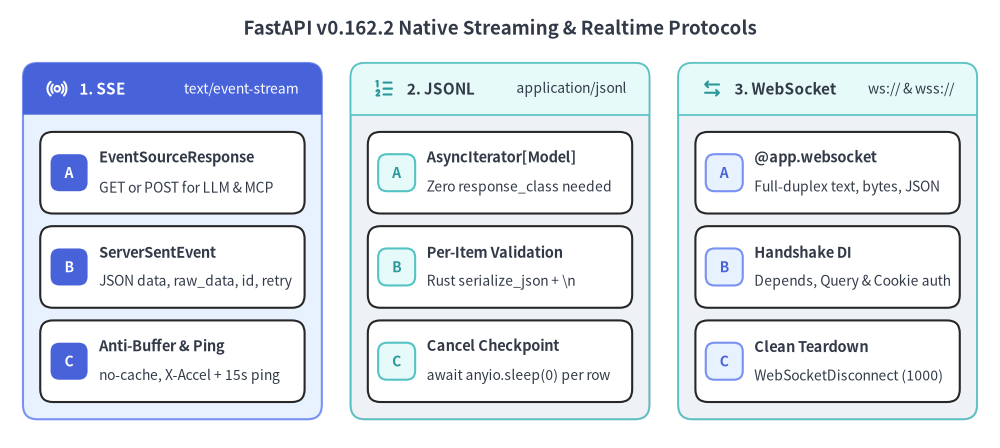
Source Code
from drawlib.canvas import save, setup
from drawlib.icons import phosphor
from drawlib.smartarts import CardList, Panel
from drawlib.styles import Styles
from drawlib.text import text

setup(width=174, height=78)

text(
    (87.0, 73.0),
    "FastAPI v0.162.2 Native Streaming & Realtime Protocols",
    style=Styles.DarkBold.patch(text_size=13.5),
)

# Column 1: Native SSE (Focal Primary Panel)
p_sse = Panel(
    "1. SSE",
    "text/event-stream",
    style=Styles.PrimaryNeutral,
    header_style=Styles.PrimaryFlat,
    text_style=Styles.WhiteBold.patch(text_size=11.0),
    description_style=Styles.White.patch(text_size=10.0),
    icon=phosphor.broadcast,
    icon_style=Styles.WhiteBold,
    header_height=9.0,
)
p_sse.draw((4.0, 5.0), width=52.0, height=62.0)
xy1, w1, h1 = p_sse.get_content_box((4.0, 5.0), width=52.0, height=62.0, padding=(3.0, 3.0))

cl_sse = CardList(
    style=Styles.White,
    text_style=Styles.DarkBold.patch(text_size=10.5),
    description_style=Styles.Dark.patch(text_size=10.0),
    badge_style=Styles.PrimaryFlat,
    badge_text_style=Styles.WhiteBold.patch(text_size=10.0),
    spacing=2.2,
)
cl_sse.add("EventSourceResponse", "GET or POST for LLM & MCP", badge_text="A")
cl_sse.add("ServerSentEvent", "JSON data, raw_data, id, retry", badge_text="B")
cl_sse.add("Anti-Buffer & Ping", "no-cache, X-Accel + 15s ping", badge_text="C")
cl_sse.draw(xy1, width=w1, height=h1)

# Column 2: Native JSON Lines (Neutral Panel)
p_jsonl = Panel(
    "2. JSONL",
    "application/jsonl",
    style=Styles.Neutral,
    header_style=Styles.SecondaryNeutral.patch(shape_line_width=1.2),
    text_style=Styles.DarkBold.patch(text_size=11.0),
    description_style=Styles.Dark.patch(text_size=10.0),
    icon=phosphor.list_numbers,
    icon_style=Styles.SecondaryBold,
    header_height=9.0,
)
p_jsonl.draw((61.0, 5.0), width=52.0, height=62.0)
xy2, w2, h2 = p_jsonl.get_content_box((61.0, 5.0), width=52.0, height=62.0, padding=(3.0, 3.0))

cl_jsonl = CardList(
    style=Styles.White,
    text_style=Styles.DarkBold.patch(text_size=10.5),
    description_style=Styles.Dark.patch(text_size=10.0),
    badge_style=Styles.SecondaryNeutral,
    badge_text_style=Styles.SecondaryBold.patch(text_size=10.0),
    spacing=2.2,
)
cl_jsonl.add("AsyncIterator[Model]", "Zero response_class needed", badge_text="A")
cl_jsonl.add("Per-Item Validation", "Rust serialize_json + \\n", badge_text="B")
cl_jsonl.add("Cancel Checkpoint", "await anyio.sleep(0) per row", badge_text="C")
cl_jsonl.draw(xy2, width=w2, height=h2)

# Column 3: Bidirectional WebSockets (Neutral Panel)
p_ws = Panel(
    "3. WebSocket",
    "ws:// & wss://",
    style=Styles.Neutral,
    header_style=Styles.SecondaryNeutral.patch(shape_line_width=1.2),
    text_style=Styles.DarkBold.patch(text_size=11.0),
    description_style=Styles.Dark.patch(text_size=10.0),
    icon=phosphor.arrows_left_right,
    icon_style=Styles.SecondaryBold,
    header_height=9.0,
)
p_ws.draw((118.0, 5.0), width=52.0, height=62.0)
xy3, w3, h3 = p_ws.get_content_box((118.0, 5.0), width=52.0, height=62.0, padding=(3.0, 3.0))

cl_ws = CardList(
    style=Styles.White,
    text_style=Styles.DarkBold.patch(text_size=10.5),
    description_style=Styles.Dark.patch(text_size=10.0),
    badge_style=Styles.PrimaryNeutral,
    badge_text_style=Styles.PrimaryBold.patch(text_size=10.0),
    spacing=2.2,
)
cl_ws.add("@app.websocket", "Full-duplex text, bytes, JSON", badge_text="A")
cl_ws.add("Handshake DI", "Depends, Query & Cookie auth", badge_text="B")
cl_ws.add("Clean Teardown", "WebSocketDisconnect (1000)", badge_text="C")
cl_ws.draw(xy3, width=w3, height=h3)

save()
1. ストリーミング方式の選定基準
エンドポイントを実装する前に、通信の方向性・再接続要件・クライアント種別に応じて最適なプロトコルを選択します。
| 比較項目 | ネイティブ SSE (EventSourceResponse) |
ネイティブ JSON Lines (AsyncIterator[T]) |
WebSocket (@app.websocket) |
|---|---|---|---|
| 通信の方向性 | サーバーからクライアントへの単方向配信(GET / POST) |
サーバーからクライアントへの HTTP チャンク配信 | 双方向(全二重)通信 |
| メディアタイプ | text/event-stream |
application/jsonl |
ステートフルな RFC 6455 フレーム |
| 自動再接続 | ブラウザ EventSource 標準対応(Last-Event-ID) |
クライアント側で HTTP リトライ制御 | クライアント側でバックオフ再接続 |
| キープアライブ | 15 秒ごとに : ping コメントを自動送出 |
チャンク送出駆動 | プロトコルレベルの Ping/Pong フレーム |
| 適したユースケース | LLM トークン配信、POST 型 MCP ストリーム、進捗通知 |
大量データの逐次エクスポート、サービス間連携 | 共同編集ルーム、低遅延な双方向制御 |
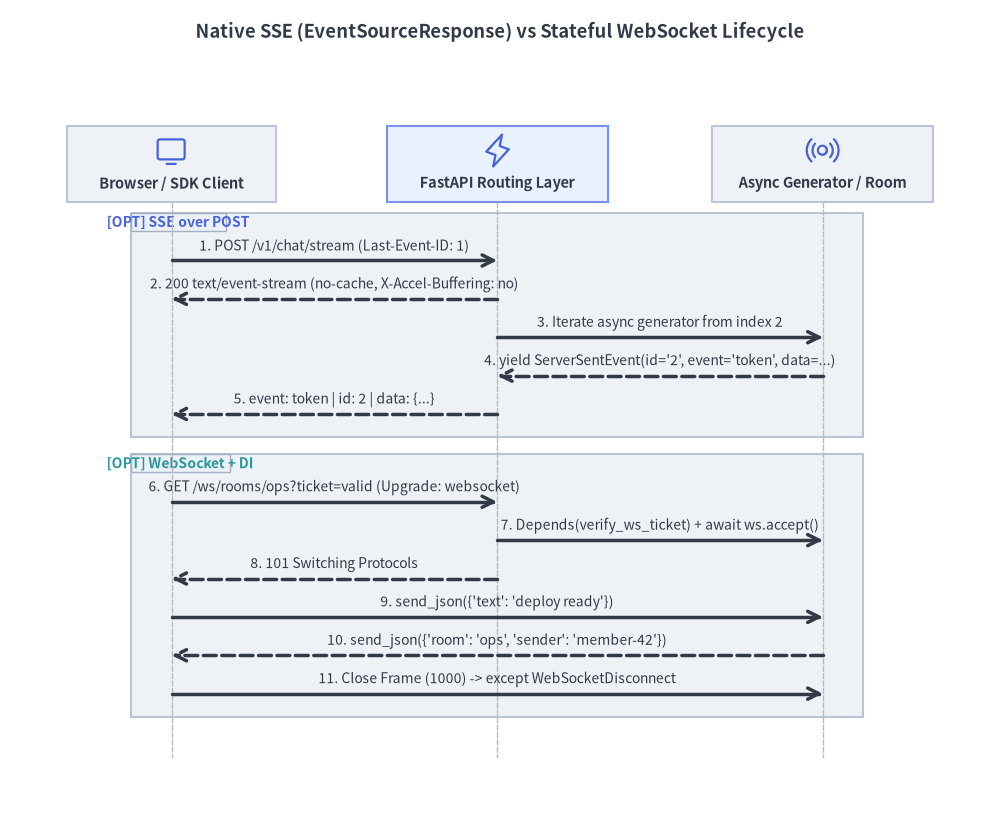
Source Code
from drawlib.canvas import save, setup
from drawlib.diagrams.sequence import Participant, PhosphorIcon, SequenceDiagram
from drawlib.styles import Styles
from drawlib.text import text

setup(width=172, height=144)

text(
    (86.0, 138.5),
    "Native SSE (EventSourceResponse) vs Stateful WebSocket Lifecycle",
    style=Styles.DarkBold.patch(text_size=13.2),
)

d = SequenceDiagram(
    node_style=Styles.Primary,
    node_text_style=Styles.DarkBold.patch(text_size=10.5),
    edge_style=Styles.DarkBold,
    edge_text_style=Styles.Dark.patch(text_size=10.0),
    node_card_style=Styles.Neutral,
    autonumber=True,
    col_width=56.0,
    step_y=6.6,
)

client = d.add(
    Participant("Browser / SDK Client", width=36, height=13, icon=PhosphorIcon.MONITOR, icon_size=6.0)
)
router = d.add(
    Participant(
        "FastAPI Routing Layer",
        width=38,
        height=13,
        icon=PhosphorIcon.LIGHTNING,
        icon_size=6.0,
        card_style=Styles.PrimaryNeutral,
    )
)
worker = d.add(
    Participant("Async Generator / Room", width=38, height=13, icon=PhosphorIcon.BROADCAST, icon_size=6.0)
)

with d.opt("SSE over POST") as sse_blk:
    sse_blk.style = Styles.Neutral.patch(line_style="dashed")
    sse_blk.text_style = Styles.PrimaryBold.patch(text_size=10.0)
    client.request(router, "POST /v1/chat/stream (Last-Event-ID: 1)")
    router.reply(client, "200 text/event-stream (no-cache, X-Accel-Buffering: no)")
    router.request(worker, "Iterate async generator from index 2")
    worker.reply(router, "yield ServerSentEvent(id='2', event='token', data=...)")
    router.reply(client, "event: token | id: 2 | data: {...}")

with d.opt("WebSocket + DI") as ws_blk:
    ws_blk.style = Styles.Neutral.patch(line_style="dashed")
    ws_blk.text_style = Styles.SecondaryBold.patch(text_size=10.0)
    client.request(router, "GET /ws/rooms/ops?ticket=valid (Upgrade: websocket)")
    router.request(worker, "Depends(verify_ws_ticket) + await ws.accept()")
    router.reply(client, "101 Switching Protocols")
    client.request(worker, "send_json({'text': 'deploy ready'})")
    worker.reply(client, "send_json({'room': 'ops', 'sender': 'member-42'})")
    client.request(worker, "Close Frame (1000) -> except WebSocketDisconnect")

d.draw(xy=(86.0, 67.0), align="center")
save()
2. ネイティブ Server-Sent Events(fastapi.sse)
FastAPI v0.162.2 は、ルーティング層と密結合した専用モジュール fastapi.sse(EventSourceResponse および ServerSentEvent)を提供します。
GETだけでなくPOSTでも動作: 従来のGET限定ラッパーとは異なり、response_class=EventSourceResponseは任意の HTTP メソッドに対応するため、JSON ボディを受け取る LLM 推論ストリームや MCP(Model Context Protocol) サーバーのPOSTストリーミングをそのまま実装できます。- リバースプロキシ対策と自動キープアライブ:
Cache-Control: no-cacheとX-Accel-Buffering: no(Nginx のレスポンスバッファリング抑止)を自動付与し、さらにfastapi_inner_astack上で分離された AnyIO メモリストリームタスクが15秒ごとに: pingコメントを送出します。ジェネレーター本体にCancelledErrorを混入させずにアイドルタイムアウトを防げる設計です。 - 型安全な
ServerSentEvent構造:dataフィールド(Pydantic モデル・辞書・文字列)は常に JSON 直列化され、事前整形済みテキスト([DONE]や HTML 断片など)には排他的なraw_dataを使用します。eventやidの改行・ヌル文字検証により SSE フォーマット破壊も防止されます。
from collections.abc import AsyncIterator
from typing import Annotated

from fastapi import FastAPI, Header
from fastapi.sse import EventSourceResponse, ServerSentEvent
from fastapi.testclient import TestClient
from pydantic import BaseModel

app = FastAPI()


class PromptRequest(BaseModel):
    prompt: str


TOKENS = ["FastAPI", "v0.162.2", "streams", "SSE"]


@app.post("/v1/chat/stream", response_class=EventSourceResponse)
async def stream_completion(
    body: PromptRequest,
    last_event_id: Annotated[str | None, Header()] = None,
) -> AsyncIterator[ServerSentEvent]:
    start_idx = int(last_event_id) + 1 if last_event_id is not None else 0
    yield ServerSentEvent(comment="stream-open", retry=3000)
    for idx in range(start_idx, len(TOKENS)):
        yield ServerSentEvent(
            data={"index": idx, "token": TOKENS[idx], "prompt": body.prompt},
            event="token",
            id=str(idx),
        )
    yield ServerSentEvent(raw_data="[DONE]", event="done")


client = TestClient(app)
res = client.post(
    "/v1/chat/stream",
    json={"prompt": "explain sse"},
    headers={"Last-Event-ID": "1"},
)
assert res.headers["content-type"].startswith("text/event-stream")
assert res.headers["x-accel-buffering"] == "no"
assert "id: 2\n" in res.text
3. ネイティブ型付き JSON Lines(application/jsonl)
バックエンドマイクロサービス間、CLI クライアント、データパイプライン向けに構造化レコードを逐次配信する場合は、response_class を指定せずジェネレーター関数の戻り値型に AsyncIterator[MyModel](または Iterator[MyModel])を宣言するだけで完結します。
- FastAPI が自動的に
media_type="application/jsonl"を設定し、OpenAPI 3.1 スキーマ にも要素モデルを出力します。 yieldされた各要素は Pydantic の Rust 製TypeAdapter(stream_item_field.serialize_json)で 1 件ずつ検証・UTF-8 JSON バイト列化(+ b"\n")され、契約違反があれば即座にResponseValidationErrorを送出します。- 非同期ジェネレーターでは 1 行送出するごとに
await anyio.sleep(0)のチェックポイントを挟むため、クライアント切断時に高速なインメモリ生成ループも即座にキャンセルされます。
from collections.abc import AsyncIterator

from fastapi import FastAPI
from fastapi.testclient import TestClient
from pydantic import BaseModel

app = FastAPI()


class MetricSample(BaseModel):
    seq: int
    service: str
    latency_ms: float


@app.get("/v1/metrics/export")
async def export_metrics() -> AsyncIterator[MetricSample]:
    samples = [
        MetricSample(seq=1, service="gateway", latency_ms=4.2),
        MetricSample(seq=2, service="billing", latency_ms=11.8),
    ]
    for sample in samples:
        yield sample


client = TestClient(app)
res = client.get("/v1/metrics/export")
assert res.headers["content-type"].startswith("application/jsonl")
rows = [MetricSample.model_validate_json(line) for line in res.text.splitlines() if line]
assert len(rows) == 2
4. DI 統合された双方向 WebSocket エンドポイント
クライアントからも低遅延にメッセージを送信し続ける必要がある場合は、@app.websocket(...) を宣言します。WebSocket ルートでも HTTP エンドポイントとまったく同じ Depends()、Query()、Header()、Cookie() の依存性解決エンジンを利用できます。
- ハンドシェイク承認前の早期拒否:
await ws.accept()を呼ぶ前に依存関数内でチケットやセッション Cookie を検証し、不正な接続はWebSocketException(code=status.WS_1008_POLICY_VIOLATION)で拒否します。 WebSocketDisconnectによる確実な後始末: 受信ループをtry ... except WebSocketDisconnect:(またはfinally:)で囲み、ブラウザタブ閉鎖や回線切断時にルーム参加状態や Pub/Sub 購読を確実に解放します。
from typing import Annotated

from fastapi import (
    Depends,
    FastAPI,
    Query,
    WebSocket,
    WebSocketDisconnect,
    WebSocketException,
    status,
)
from fastapi.testclient import TestClient

app = FastAPI()
events: list[str] = []


async def verify_ws_ticket(
    ticket: Annotated[str | None, Query()] = None,
) -> str:
    if ticket != "valid-ticket":
        raise WebSocketException(
            code=status.WS_1008_POLICY_VIOLATION,
            reason="Invalid or missing ticket",
        )
    return "member-42"


@app.websocket("/ws/rooms/{room_id}")
async def room_socket(
    ws: WebSocket,
    room_id: str,
    member_id: Annotated[str, Depends(verify_ws_ticket)],
) -> None:
    await ws.accept()
    events.append(f"join:{room_id}:{member_id}")
    try:
        while True:
            payload = await ws.receive_json()
            await ws.send_json(
                {"room": room_id, "sender": member_id, "text": payload["text"]}
            )
    except WebSocketDisconnect:
        events.append(f"leave:{room_id}:{member_id}")


client = TestClient(app)
with client.websocket_connect("/ws/rooms/ops?ticket=valid-ticket") as socket:
    socket.send_json({"text": "deploy ready"})
    assert socket.receive_json()["sender"] == "member-42"
assert events == ["join:ops:member-42", "leave:ops:member-42"]
続いて第 6 章の ネイティブ OpenTelemetry と例外処理 では、依存解決・エンドポイント・ストリーム・例外を横断的に可視化する組み込みテレメトリ基盤を解説します。